
Image to Video AI
Turn a photo into a video with Kling, Veo, Seedance or Wan. Upload it, say how it moves — clips from 23 credits.
Add your photo, pick a model and a length. The price is on the button before you run. Where your photo goes · Plans
Picture to video: where your photo goes
Image to video AI starts from your picture and makes it move. On Seedara the picture can play four parts: the opening frame, the first and the last frame, key frames along the clip, or a reference the model follows without copying it frame for frame. Which parts you get depends on the model.
First frame
The clip opens on your photo and moves on from there. Every model on this page can do it.
15 models
First and last frame
Give two pictures: the clip starts on one and ends on the other, and the model fills the motion in between.
Key frames along the clip
Kling 4.0 takes up to 10 pictures in all and moves through them in order — a short story told in stills.
1 model
A reference, not a frame
The picture shows who or what must appear — a character, a product, a place — and the model builds new shots around it.
Photo to video AI free: what you really get
Image to video is not free on Seedara: every clip is paid to the model maker. A free account gets 100 credits every 30 days for images, audio and text, so you can make the picture for free and animate it later.
Video starts on the Starter plan at $19 a month. Each tag below shows the lowest price of one clip on that model, in credits from your balance.
Price of one clip, lowest first
Image to video with sound
Kling 4.0, Seedance 2.5 and 2.0, all three Veo 3.1 models, MiniMax H3 and Grok Imagine make the sound together with the picture — voices, effects and background. On Wan 3.0 and Kling 3.0 you switch it on or off.
Longer clips: up to 30 seconds
One clip runs up to 30 seconds on Kling 4.0, Seedance 2.5 and Wan 3.0, up to 15 on Seedance 2.0, Kling 3.0 and MiniMax H3, and up to 8 or 10 on the rest. The tags show the shortest clip; a longer one costs more.
Credits are rounded up. ≈ $ is the credit price on the plan the model opens with: Starter $19 for 2,000 credits, Plus $59 for 6,500 credits, Ultra $129 for 15,000 credits.
Which photos each model takes
Most refused runs start with the photo, not the prompt. Seedance 2.0 and 2.5 turn down real faces; Veo turns down famous people and children. Here is who takes what.
A photo of you
Your own face as the first frame works on Kling, Veo, Wan, Hailuo, MiniMax, Runway and Grok Imagine. Seedance refuses any real face.
 Kling: takes it
 Veo: takes it
 Seedance: refuses
 Wan: takes it
 Hailuo: takes it
 MiniMax H3: takes it
 Runway: takes it
 Grok Imagine: takes it
Someone you know
The same models, but only with that person's consent: using someone's face without it breaks every model's rules.
- Kling: with their consent
- Veo: with their consent
- Seedance: refuses
- Wan: with their consent
- Hailuo: with their consent
- MiniMax H3: with their consent
- Runway: with their consent
- Grok Imagine: with their consent
A famous person
Veo and Seedance refuse it, and on the other models it breaks the rules on using a person's likeness without consent.
- Kling: not allowed
- Veo: not allowed
- Seedance: not allowed
- Wan: not allowed
- Hailuo: not allowed
- MiniMax H3: not allowed
- Runway: not allowed
- Grok Imagine: not allowed
A realistic face made by AI
Fine on most models. Seedance often refuses it too: its check can't tell a realistic AI face from a photo. Cartoon and 3D faces pass.
- Kling: takes it
- Veo: takes it
- Seedance: refuses
- Wan: takes it
- Hailuo: takes it
- MiniMax H3: takes it
- Runway: takes it
- Grok Imagine: takes it
Products, pets, places, drawings
Every model takes them: a product shot, your dog, a room, a sketch, anime or a 3D render.
- Kling: takes it
- Veo: takes it
- Seedance: takes it
- Wan: takes it
- Hailuo: takes it
- MiniMax H3: takes it
- Runway: takes it
- Grok Imagine: takes it
Every model also runs its own content check on the picture and the prompt.
Before you press Generate
Seven quick checks that save a failed run. Tick them off as you go.
Pictures in, video out
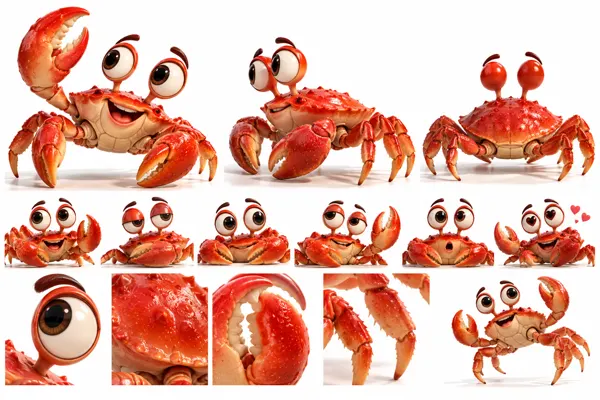
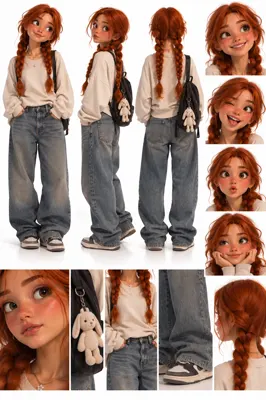
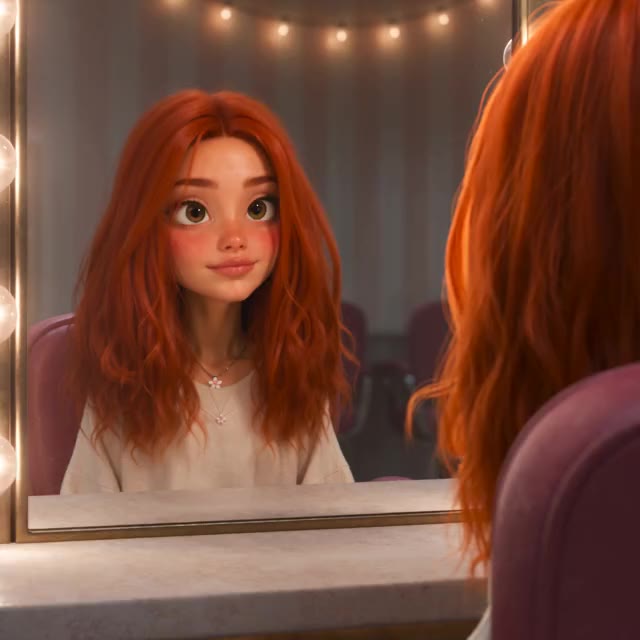
Two clips from the Seedara community, each with the pictures its author uploaded. The model kept the people, the product and the character from these pictures.
2 pictures in
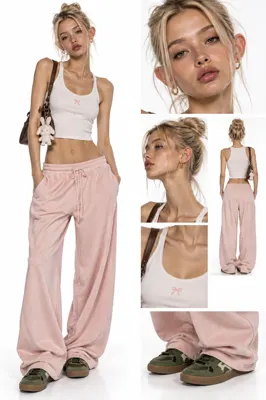
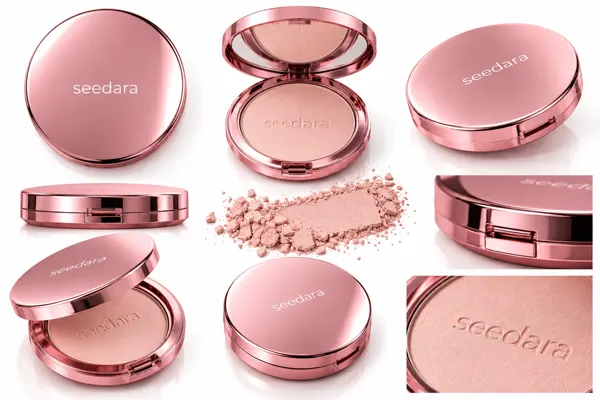
video out
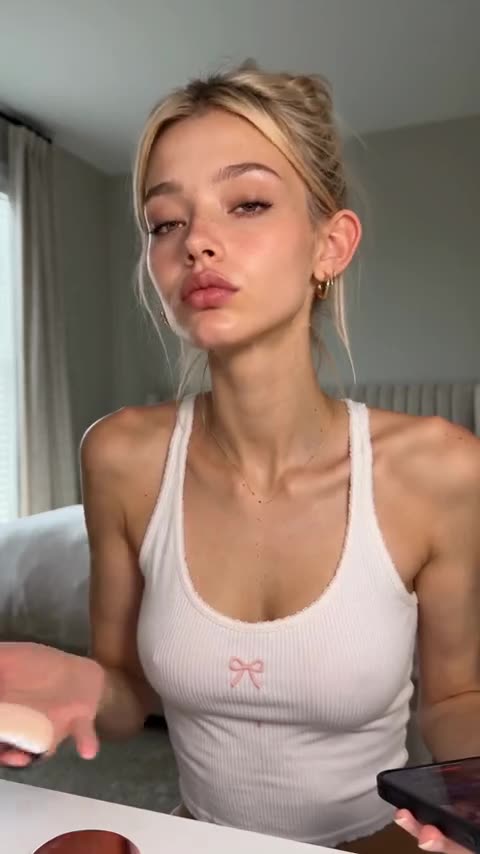
A presenter and a product become a vertical ad
A character sheet of the presenter and a sheet of the powder compact: Seedance 2.5 made a 10-second 9:16 ad from them.
2 pictures in
video out
Two characters become a 3D scene
A cartoon crab and a red-haired girl, each on its own sheet: Seedance 2.5 put them in one 10-second square scene.
Make a clip, animate it or let it talk
One photo can go three ways on Seedara, and without a photo there is a fourth.
Image to video AI: questions
- How can I turn a picture into a video for free?
- On Seedara you can't: video is paid on every model, because each clip is paid to the model maker. What is free is the picture — a free account gets free credits for image models. Make the picture there, then animate it on the Starter plan or higher.
- Is there a free, unlimited image to video AI without a watermark?
- Not here. The limit is your credit balance, and each clip has its price on the button. Seedara adds its watermark only on the free plan, and video comes with paid plans, so your clips carry no Seedara mark. Google adds its invisible SynthID mark to every Veo video.
- Can I use image to video AI without signing up?
- No. To run a model you need a Seedara account with a confirmed email, or you can sign in with Google. You can open the studio and write your prompt before that; the account keeps your credits and your videos.
- Can AI turn my photo into a video?
- Yes. Every model on this page takes a photo as the first frame of the clip, and most also take a last frame. Upload the photo, describe the motion, pick the length and run. The finished clip is saved in your library and downloads as MP4.
- Is there an image to video AI with no restrictions?
- No. Every model maker checks the picture and the prompt and refuses some content — explicit sexual content, anything that sexualises minors, and real people without their consent. Within those rules, any scene, style or format the model offers is yours to use.
- Which image to video model should I choose?
- For a photo of a person, start with Kling 4.0: it takes real faces, which Seedance refuses, and runs up to 30 seconds with sound. For the lowest price, try Veo 3.1 Lite. For many reference pictures, Seedance 2.5. For any length from 2 to 30 seconds, Wan 3.0.
- Can ChatGPT do image to video?
- Seedara doesn't use ChatGPT for video. Here image to video runs on video models made for it — Kling, Veo, Seedance, Wan, Hailuo, MiniMax, Runway and Grok Imagine — and you can try the same photo on several of them from one balance.
- Can I use the videos commercially?
- Seedara allows commercial use on every plan. Follow the model maker's terms too, and don't put other people's faces, brands or characters in a video without permission.
- Is there an image to video app?
- Seedara has no app in the app stores. It works in the browser on a phone, tablet or computer, with no software to install: upload a photo from your gallery right in the page and download the clip as MP4.
All image to video models on Seedara
Each model has its own page with every setting and its full price list.
- Kling 4.0
- Veo 3.1 Lite
- Seedance 2.5
- Seedance 2.5 Flash
- Wan 3.0
- Hailuo 2.3 Fast
- Veo 3.1 Fast
- Veo 3.1
- Seedance 2.0
- Kling 3.0
- Kling 2.5 Turbo Pro
- Hailuo 02
- MiniMax H3
- Runway Gen-4.5
- Grok Imagine